 Search Tips
Why do my system's panel and the app show different states of system readiness?
This can be the result of communication problems between the mobile device running the app and your security system.
On the website:
-
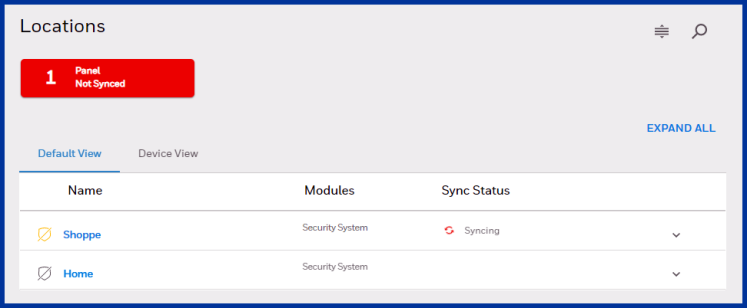
If your account has more than one Location: Select Locations on the vertical menu at the left side of the screen. This page appears. If one of the Locations in your account needs synchronization, the red notification seen here is displayed.
-
Click the notification and the page calls out the Location with the un-synced system panel.
-
Click the_
 _button to start syncing the panel with
 -
A notification appears when sync is complete, or if synchronization fails.
If this does not resolve the problem, or if Panel Sync can't be performed, check your device's connectivity. Cellular signal strength and the availability (or lack of) Wi-Fi can affect synchronization of status and other information between your mobile device and your system's control panel. If you are on the premises, check the panel's cell and Wi-Fi connections, too. If the problem persists, contact your security professional.
On the apps:
-
If your system has more than one location, select the one you want to work with.
-
Click the location that shows the__icon. A progress display
 appears.
 -
A notification appears when sync is complete, or if synchronization fails.
If this does not resolve the problem, or if Panel Sync can't be performed, check your mobile device's connection(s) to the outside world. Cellular signal strength and the availability (or lack of) Wi-Fi can affect synchronization of status and other information between your mobile device and your system's control panel. If you are on the premises, check the panel's cell and Wi-Fi connections, too. If the problem persists, contact your security professional.