 Search Tips
How do I monitor my VX1 doorbell live? How do I record it?
You can stream live video and initiate recordings from your VX1 doorbell on the Remote Services/Total Connect mobile apps.
The controls are similar on the iOS and Android apps. These examples are taken from the iOS app.
- On the Home page of the app, touch the
 button. The cameras and doorbells at the selected Location are displayed.
 -
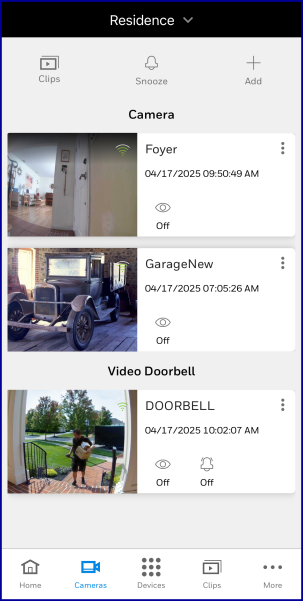
- Touch the video doorbell's preview image to launch the live feed from the doorbell's camera. Remember that the preview image is not live. Typically, camera-preview thumbnails show the image associated with that camera's last motion/sound detection event OR the camera's last manually triggered snapshot.
- The doorbell's live view appears.
Three options are available at the bottom of the screen:
- Touch
 to record a video clip from the doorbell camera
 - Touch and hold
 to talk to a person at the door
 - Touch
 to save a snapshot (still image) from the doorbell camera
Two options are superimposed on the live picture:
- Touch
 to trigger the doorbell's built-in siren and spotlight LED
 - Touch
 to make the live feed full-screen (you'll probably need to rotate your phone or tablet 90 degrees)