 Search Tips
Can Events Be Hidden Or Deleted?
For your security, events cannot be deleted from the Activity log.
Entries expire automatically after 90 days.
This policy helps ensure the availability of your system's records if they are required by law enforcement or other authorities.
Hiding entries in the Activity log
When working with the Activity log, you might wish to simplify the displayed list by hiding entries you've already looked at. To do so:
- Click
 in the row of the entry you want to hide.
 -
The options to mark an event a Favorite or to hide it appear.
-
Click Hide activity and the entry disappears from the list but is not deleted.
Note that hidden entries can be displayed again by clicking the button.png) button and selecting Show Hidden Events:
button and selecting Show Hidden Events:
button and selecting Show Hidden Events: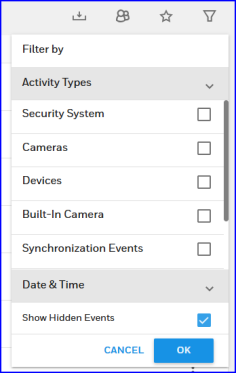
For more about the Activity log, see the FAQ What's in the Activity log? (And can I sort or filter it?)
For more about snapshots and video clips triggered by the system, see the FAQ What does "Camera Activities" mean?